Old news: New in CodonCode Aligner Version 1.4
This page describes the most important changes and new features that were introduced in CodonCode Aligner version 1.4. All of these new features have been requested by users - thanks to all who have given us feedback. Changes include features to organize, find, and rename sequences; improvements in mutation detection; and other features like speed improvements and user-defined locations for the preference file.
This release is a free update to all CodonCode Aligner customers.
Please note that this page is does not describe the most recent new features in CodonCode Aligner - the newest changes are described here.
Organizing and Finding Sequences
- Manual folders: You can now create folders in the project view to organize unassembled sequences.
- Icons for alignments: Alignments to reference sequences now have icons that are different from assembled contigs, making it easy to see whether a contig is an alignment or an assembly.
- Find by name: You can search for sequences by name in the project view, contig view, and trace view.
- Easy renaming: Sequences and contigs can now be renamed directly in the contig view. Names can contain spaces, accented characters, etc.
The following screen shot illustrates these features:

New & Improved Mutation Detection Features
- Multiple reference sequences: A project can now have multiple reference sequences, which can be different or identical.
- Better Genbank file reading: When reading sequences from text files in Genbank format, Aligner will now parse all coding sequence ("CDS") tags as well as "variation" tags that describe known mutations.
- Fast editing of false positives: False positive heterozyous point mutations can now quickly be marked as "false positives" from popup menus or the corresponding keyboard shortcut.
- Mutation tables now are updated when you edit mutations
- Protein translations for coding regions: For alignments or contigs with defined coding regions, the protein translation for the defined coding region(s) can be shown.
- Improved heterozygous indel detection: The sensitivity and accuracy of heterozygous indel detection has been improved substantially.
- Improved heterozygous indel analysis: CodonCode Aligner version 1.4 now offers two seperate methods to analyse heterozygous indels - trace subtraction and second peak analysis. The "second peaks analysis" methods can give sequence estimates for heterozygous indels even if no reference chromatograms are available. Trace subtraction has been optimized to give better results if the sequence from the mutated allele is weaker than the non-mutated sequence.
The screen shot below shows an example of the new indel processing:
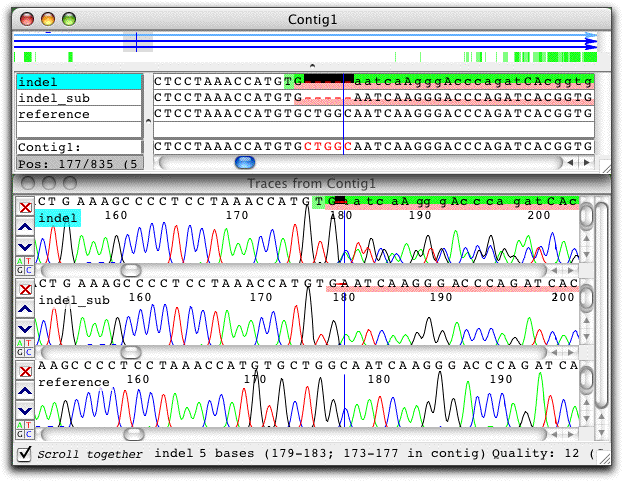
In the sample at the top ("indel"), the base calls have been replaced by the deducted sequence of the second allele. The sequence in the middle ("indel_sub") is the artificial sequence created by subtracting a scaled reference trace (shown at the bottom) from the indel trace. Note that both algorithm give the same sequence, which has a 5 base deletion.
Other New Features and Improvements
- Speed improvements: Project opening, alignments to large reference sequences, and scrolling in contig views and trace views is faster.
- Bug fixes: Many bugs in older versions of CodonCode Aligner have been fixed.
- View synchronization: Moving in one view will now correctly move to the corresponding position in other open views (if the sequence is shown in other views)
- Trace views: The width of trace view windows is now remembered and used when opening new trace views.
- Custom preferences: Users can now define the location of preference files, for example to use shared preferences for work groups from a network disk. Preference files can also be "locked" by not writing any changes back to the preferences.
- Contig view printing: The protein translation is now included when the contig view is printed.
- Double-clicking on text sequences: When double-clicking on sequences that do not have chromatograms, a base view window is opened.
- Better gap placement: The alignment and assembly methods now use separate gap initiation and extension penalties, which typically leads to better placement of gaps.
The screen shots below show the improvements in gap placement. The first image shows the placement of gaps with CodonCode Aligner version 1.4.0 beta 3:

The image below shows the gap placement with CodonCode Aligner 1.3.4:

Clearly, the use of separate "gap initiation" penalties results in much better placement of gaps.
Please note that this page is does not describe the most recent new features in CodonCode Aligner - the newest changes are described here.
